A2UI over Model Context Protocol (MCP)
This guide shows you how to serve rich, interactive A2UI interfaces from an MCP server using Tools and Embedded Resources. By the end, you'll have a working MCP server that returns A2UI components to any MCP-compatible client.
Prerequisites
Ensure you have the following installed before you begin:
- Python (version 3.10 or later).
- uv for fast Python package management.
- Node.js (version 18 or later) for the MCP Inspector.
Quick Start: Run the Sample
Before diving into the protocol details, let's get a working example running. The A2UI repository includes a ready-to-go MCP recipe demo.
# Clone the repo (if you haven't already)
git clone https://github.com/a2ui-project/a2ui.git
cd a2ui/samples/community/mcp/a2ui-over-mcp-recipe

# Start the MCP server (SSE transport on port 8000)
uv run .
Option A: Interacting via the MCP Inspector
In a separate terminal, launch the MCP Inspector to interact with the server:
npx @modelcontextprotocol/inspector@latest --web --transport sse --server-url http://localhost:8000/sse
Open http://localhost:6274:
- Click List Resources → you will see
a2ui://recipe-formanda2ui://recipe-card. - Read a resource → the content contains the static A2UI presentation template (
createSurfaceandupdateComponents) with data bindings. - Click List Tools → you will see
get_recipe_form_a2uiandget_recipe_a2ui, both carrying_meta.uilinks to their respective presentation template resource. - Run
get_recipe_form_a2ui→ the tool returns the initial form selection state wrapped in anupdateDataModelmessage. - Run
get_recipe_a2uiwith custom parameters → the tool returns dynamic recipe details wrapped in anupdateDataModelmessage.
The sample uses a local path reference to the A2UI Agent SDK. For your own projects, install from PyPI:
Option B: Running the Recipe Client Web App
To run the interactive web client:
Running built-in sample applications within the A2UI repository uses Yarn workspaces (yarn install / yarn dev). Outside this repository, you can use any package manager (npm, pnpm, yarn).
- In a new terminal window, navigate to the client directory:
- Install dependencies:
- Start the Vite development server:
- Open your browser to
http://localhost:5173.
When the application loads, the client connects to the MCP server via SSE and executes get_recipe_form_a2ui. It reads _meta.ui to fetch and cache the a2ui://recipe-form presentation template, then applies the returned updateDataModel to populate default choices (Grilled, Chicken). Picking options and clicking "Get Recipe" executes get_recipe_a2ui, fetching a2ui://recipe-card and dynamically rendering the recipe details in the right column.
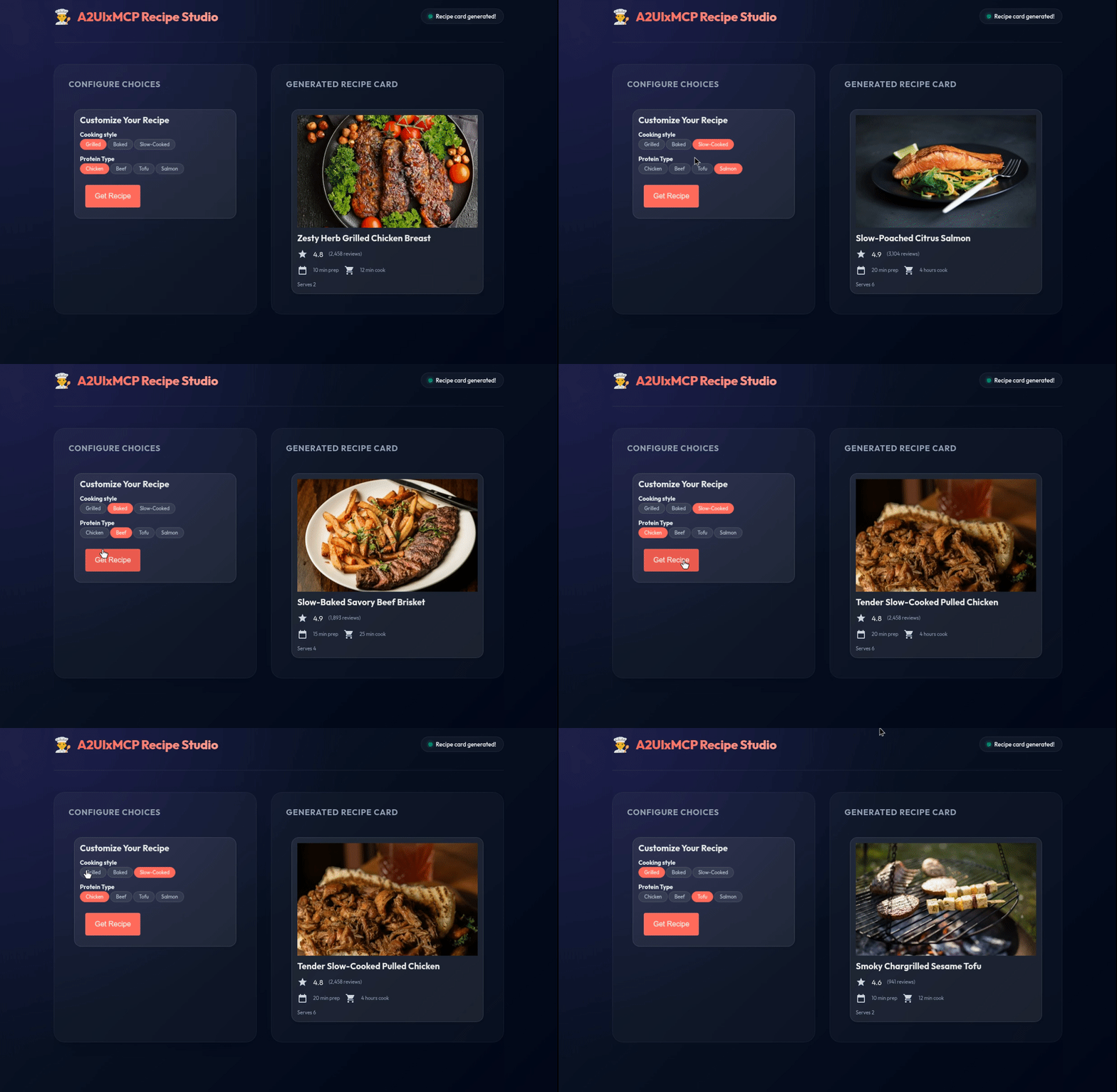
See all samples at samples/community/mcp/.
Decoupled Architecture: Separating Presentation from Data
A2UI over MCP separates user interfaces into two layers:
- Static Presentation Templates via MCP Resources (
resources/read): Layouts containing component trees (createSurfaceandupdateComponents) with data bindings (such as/title,/cookTime,/image) are served as MCP resources under custom URIs (e.g.,a2ui://recipe-form,a2ui://recipe-card) with MIME typeapplication/a2ui+json. Because templates contain no hardcoded data values, the client can fetch and cache them locally. - Dynamic Data Updates via MCP Tools (
tools/call): When a tool executes, the server returns only the dynamic values needed by the template, packaged as an A2UIupdateDataModelmessage. - Tool UI Metadata (
_meta.ui): The tool links to its presentation template by including a_meta.uiobject in its tool definition and in itsCallToolResult: - Client-Side Resolution & Hydration:
The client host inspects
_meta.ui.resourceUri, checks its local template cache (or fetches the resource from the server on first load), initializes the surface layout, and applies the dynamicupdateDataModelfrom the tool response.
MIME Type Uniformity
Both static template resources and dynamic tool payloads use the application/a2ui+json MIME type. In tool responses, data model updates are returned inside an EmbeddedResource alongside a fallback TextContent. This identification allows client applications to route payloads directly to A2UI processors.
Delivery Flow
1. Tool Invocation
Client → tools/call (e.g. get_recipe_a2ui) → MCP Server
                                                  ↓
                                        Compute dynamic values
                                                  ↓
Client ← CallToolResult (updateDataModel) ← MCP Server
         + _meta.ui: { resourceUri: "a2ui://recipe-card" }

2. Template Resolution (Cached After First Fetch)
If "a2ui://recipe-card" is not in client cache:
  Client → resources/read ("a2ui://recipe-card") → MCP Server
  Client ← Template (createSurface, updateComponents) ← MCP Server

3. Surface Hydration
Client applies updateDataModel from tool response to the surface.
A2UI Renderer updates display.
1. Defining Presentation Templates as MCP Resources
Expose static layout templates via resources/list and resources/read:
@app.list_resources()
async def list_resources() -> list[types.Resource]:
    return [
        types.Resource(
            uri="a2ui://recipe-form",
            name="Recipe Form",
            mimeType="application/a2ui+json",
            description="Static form allowing users to pick cuisine and protein.",
        ),
        types.Resource(
            uri="a2ui://recipe-card",
            name="Recipe Card",
            mimeType="application/a2ui+json",
            description="Static recipe card layout template.",
        ),
    ]


@app.read_resource()
async def read_resource(uri: str) -> list[ReadResourceContents]:
    if str(uri) == "a2ui://recipe-form":
        return [
            ReadResourceContents(
                content=json.dumps(recipe_form_json),
                mime_type="application/a2ui+json",
            )
        ]
    if str(uri) == "a2ui://recipe-card":
        return [
            ReadResourceContents(
                content=json.dumps(recipe_a2ui_json),
                mime_type="application/a2ui+json",
            )
        ]
    raise ValueError(f"Unknown resource: {uri}")
2. Declaring Tool UI Metadata
Declare the presentation resource URI on the tool definition:
types.Tool(
    name="get_recipe_a2ui",
    title="Get Recipe A2UI",
    description="Returns recipe data and links to the recipe-card template.",
    inputSchema={
        "type": "object",
        "properties": {
            "cookingStyle": {
                "type": "array",
                "items": {"type": "string"},
                "description": "Selected cooking styles",
            },
            "protein": {
                "type": "array",
                "items": {"type": "string"},
                "description": "Selected proteins",
            },
        },
        "additionalProperties": True,
    },
    _meta={
        "ui": {
            "resourceUri": "a2ui://recipe-card",
            "mimeType": "application/a2ui+json",
        }
    },
)
3. Returning Dynamic Data via Tool Execution
In the tool call handler, return the dynamic state as an updateDataModel message with _meta.ui:
@app.call_tool()
async def handle_call_tool(
    name: str, arguments: dict[str, Any]
) -> types.CallToolResult:
    if name == "get_recipe_a2ui":
        # Resolve selected recipe from user arguments
        style_list = arguments.get("cookingStyle", ["Baked"])
        protein_list = arguments.get("protein", ["Salmon"])
        style = style_list[0] if style_list else "Baked"
        protein = protein_list[0] if protein_list else "Salmon"
        recipe = RECIPES.get((style, protein))

        # Generate lightweight updateDataModel payload
        data_model_update = [
            {
                "version": "v0.9",
                "updateDataModel": {
                    "surfaceId": "recipe-card",
                    "path": "/",
                    "value": {
                        "title": recipe["title"],
                        "rating": recipe["rating"],
                        "reviews": recipe["reviews"],
                        "cookTime": recipe["cookTime"],
                        "prepTime": recipe["prepTime"],
                        "servings": recipe["servings"],
                        "image": recipe["image"],
                    },
                },
            }
        ]

        return types.CallToolResult(
            content=[
                types.TextContent(
                    type="text",
                    text=f"Generated recipe: {recipe['title']}",
                ),
                types.EmbeddedResource(
                    type="resource",
                    resource=types.TextResourceContents(
                        uri="a2ui://recipe-card/data",
                        mimeType="application/a2ui+json",
                        text=json.dumps(data_model_update),
                    ),
                ),
            ],
            _meta={
                "ui": {
                    "resourceUri": "a2ui://recipe-card",
                    "mimeType": "application/a2ui+json",
                }
            },
        )
Catalog Negotiation
Before a server can send A2UI to a client, they must establish which catalogs are available. Depending on your architecture, this can happen in one of two ways.
Option A: During MCP Initialization (Recommended)
MCP is a stateful session protocol, so the most efficient approach is to declare capabilities once during connection setup. The client declares its A2UI support under capabilities:
{
  "jsonrpc": "2.0",
  "method": "initialize",
  "id": "init-123",
  "params": {
    "protocolVersion": "2025-11-25",
    "clientInfo": {
      "name": "a2ui-enabled-client",
      "version": "1.0.0"
    },
    "capabilities": {
      "a2ui": {
        "clientCapabilities": {
          "v0.9": {
            "supportedCatalogIds": [
              "https://a2ui.org/specification/v0_9/basic_catalog.json"
            ]
          }
        }
      }
    }
  }
}
The server stores this state for the duration of the session.
Option B: Per-Message Metadata (For Stateless Servers)
If your server must remain stateless, the client can pass A2UI capabilities in the _meta field of every tool call:
{
  "jsonrpc": "2.0",
  "method": "tools/call",
  "id": "id-123",
  "params": {
    "name": "generate_report",
    "arguments": {"date": "2026-03-01"},
    "_meta": {
      "a2ui": {
        "clientCapabilities": {
          "v0.9": {
            "supportedCatalogIds": [
              "https://a2ui.org/specification/v0_9/basic_catalog.json"
            ],
            "inlineCatalogs": []
          }
        }
      }
    }
  }
}
Handling User Actions
Interactive components like Button can trigger actions that are sent back to the server as MCP tool calls.
1. Define a Button with an Action
In your A2UI JSON, add an action to a component:
{
  "id": "confirm-button",
  "component": {
    "Button": {
      "child": "confirm-button-text",
      "action": {
        "event": {
          "name": "confirm_booking",
          "context": {
            "start": "/dates/start",
            "end": "/dates/end"
          }
        }
      }
    }
  }
}
2. Client Sends the Action as a Tool Call
When the user clicks the button, the client resolves data bindings (like /dates/start) against the surface state and sends a tool call with the required action fields:
{
  "jsonrpc": "2.0",
  "method": "tools/call",
  "id": "id-456",
  "params": {
    "name": "a2ui_action",
    "arguments": {
      "name": "confirm_booking",
      "surfaceId": "booking-surface",
      "sourceComponentId": "confirm-button",
      "timestamp": "2026-03-20T12:00:00Z",
      "context": {
        "start": "2026-03-20",
        "end": "2026-03-25"
      }
    }
  }
}
3. Handle the Action on the Server
@app.tool()
async def a2ui_action(
    name: str,
    surfaceId: str,
    sourceComponentId: str,
    timestamp: str,
    context: dict[str, Any],
) -> types.CallToolResult:
    """Handle A2UI user actions."""
    if name == "confirm_booking":
        # Process the booking, then return confirmation UI
        return types.CallToolResult(content=[
            types.TextContent(
                type="text",
                text=f"Booking confirmed for {surfaceId}: {context['start']} to {context['end']}"
            )
        ])
    raise ValueError(f"Unknown action: {name}")
All five action fields (name, surfaceId, sourceComponentId, timestamp, and context) are required by the A2UI specification. Declaring all fields in the tool parameters prevents MCP SDKs from stripping surfaceId or other fields, losing the originating surface context.
Error Handling
Clients can report A2UI rendering and validation errors back to the server via a tool call:
{
  "jsonrpc": "2.0",
  "method": "tools/call",
  "id": "id-789",
  "params": {
    "name": "a2ui_error",
    "arguments": {
      "code": "VALIDATION_FAILED",
      "surfaceId": "booking-surface",
      "path": "/components/0/text",
      "message": "Failed to parse A2UI payload."
    }
  }
}
Handle it on the server:
@app.tool()
async def a2ui_error(
    code: str,
    surfaceId: str,
    message: str,
    path: str | None = None,
) -> types.CallToolResult:
    """Handle A2UI client errors."""
    # Log the error, retry, or send a fallback UI
    return types.CallToolResult(content=[
        types.TextContent(
            type="text",
            text=f"Acknowledged error {code} on surface {surfaceId}: {message}"
        )
    ])
Verbalization and Visibility Control
Control whether the LLM can "read" A2UI payloads in subsequent turns using MCP Resource Annotations:
a2ui_resource = types.EmbeddedResource(
    type="resource",
    resource=types.TextResourceContents(
        uri="a2ui://training-plan-page",
        mimeType="application/a2ui+json",
        text=json.dumps(a2ui_payload)
    ),
    # Show the UI to the user, but hide the raw JSON from the LLM
    annotations=types.Annotations(audience=["user"])
)
| Audience | Behavior |
|---|---|
| (empty) | Visible to both user and LLM |
["user"] |
Rendered for the user; hidden from LLM context |
["assistant"] |
Available to LLM for follow-up reasoning; not rendered |
Using the A2UI Agent SDK
For production use, the A2UI Agent SDK handles schema management, validation, and prompt generation for you:
from a2ui.strategies.schema import A2uiSchemaManager
from a2ui.basic_catalog.provider import BasicCatalog

# Initialize the schema manager with the basic catalog
schema_manager = A2uiSchemaManager(
    catalogs=[BasicCatalog.get_config()],
)

# Validate A2UI output before sending
selected_catalog = schema_manager.get_selected_catalog()
selected_catalog.validator.validate(a2ui_payload)
See the full Agent Development Guide for details on schema management, dynamic catalogs, and streaming.
Next Steps
- A2UI Specification — full protocol reference
- Component Gallery — browse available components
- MCP Apps in A2UI Surface — embed HTML-based MCP apps inside A2UI
- Client Setup — build a renderer that displays A2UI