Render A2UI Inside an MCP App
An MCP App can bundle an embedded A2UI web renderer inside its ui:// HTML resource (text/html;profile=mcp-app) so existing Model Context Protocol (MCP) hosts display interactive A2UI surfaces without adding A2UI renderer code to the host application.
Instead of requiring every MCP client (such as Claude Desktop, the MCP Inspector, or an IDE) to install an A2UI SDK, your MCP server ships a self-contained HTML bundle that mounts <a2ui-surface> inside the host’s isolated iframe. When tools on the server return application/a2ui+json payloads, the embedded app feeds those messages into its own MessageProcessor and forwards user actions back through the MCP Apps tools/call channel.
Quick start: run the community sample
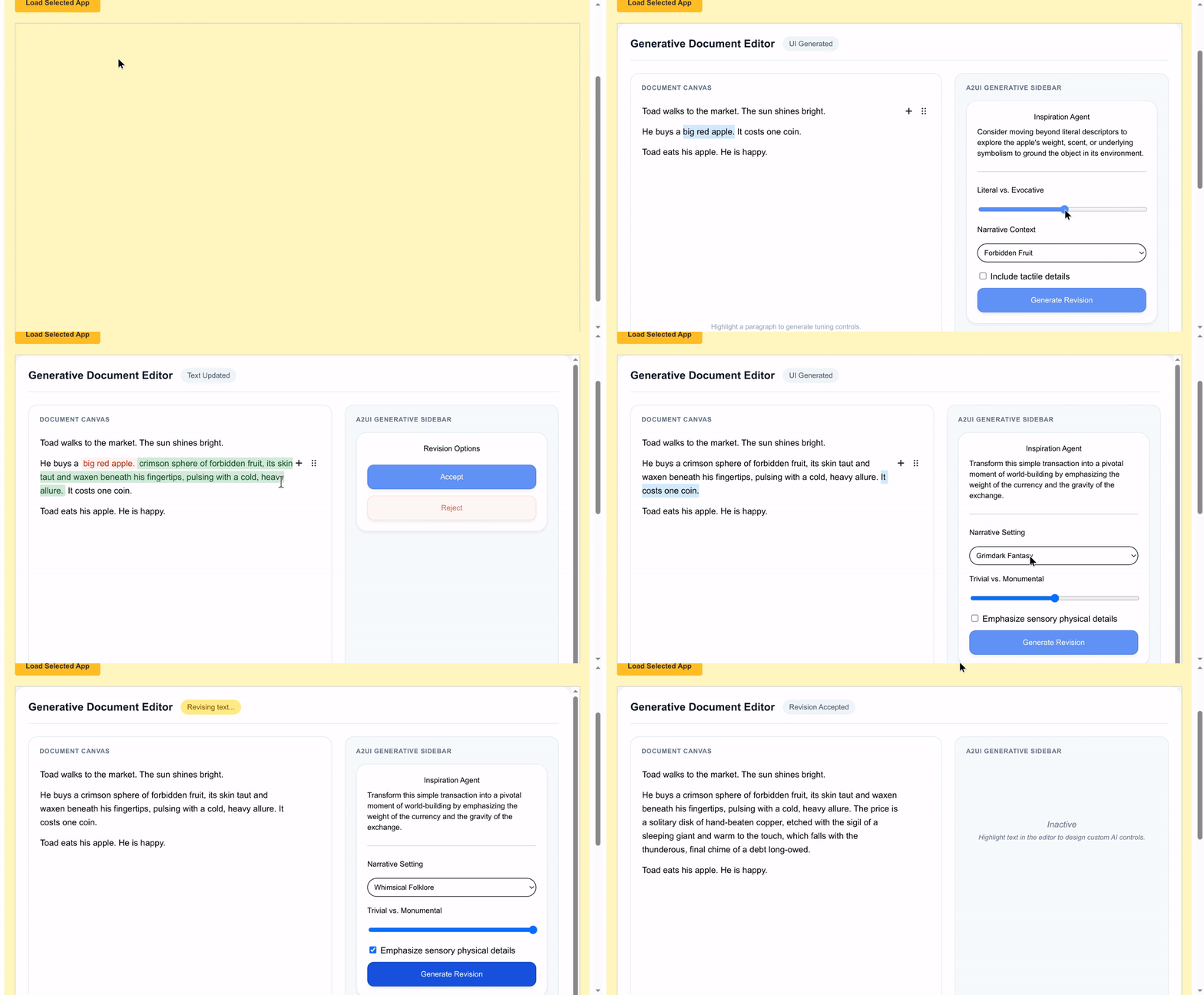
The samples/community/mcp/a2ui-in-mcpapps/ directory contains a runnable end-to-end sample with a Python MCP server (server/server.py), two single-file Angular micro-apps (ui://editor/app for a generative document editor and ui://basic/app for a counter), and a sample Angular MCP Apps host (client/) that runs a double-iframe sandbox on http://localhost:4200.
Prerequisites
Install these tools before building and running the sample from a clone of the A2UI repository:
- Python 3.10 or later and
uvfor the Python MCP server (server/.python-versiontargets Python 3.13 when managed byuv). - Node.js 22.12 or later with Corepack enabled (
corepack enable) soyarnresolves the standalone Yarn workspace undersamples/community/. - A
GOOGLE_API_KEYfrom Google AI Studio soserver/smart_editor_agent.pycan initialize its Gemini client at startup and generate contextual editor controls (if a Gemini call fails at runtime, the editor falls back to preset slider controls).
Build the sandbox relay and micro-apps
The server serves single-file HTML bundles from server/apps/public/, which are git-ignored in a fresh checkout. Install the samples/community workspace dependencies, build the host’s outer sandbox relay, and build both micro-apps from the repository root:
cd samples/communityyarn install
# Build the host's outer sandbox relay (client/public/sandbox_iframe/)yarn workspace a2ui-in-mcpapps-client run build:sandbox
# Build and inline the Editor micro-app (server/apps/public/editor.html)yarn workspace basic-mcp-app-angular-editor run build:all
# Build and inline the Basic Counter micro-app (server/apps/public/app.html)yarn workspace basic-mcp-app-angular run build:all
When iterating on a single micro-app, you can run yarn build:all directly inside samples/community/mcp/a2ui-in-mcpapps/server/apps/editor or samples/community/mcp/a2ui-in-mcpapps/server/apps/src.
Start the MCP server and host client
Open two terminals starting from the repository root.
-
In the first terminal, start the Python MCP server over Server-Sent Events (SSE) on
http://127.0.0.1:8000/sse(pass--transport stdioinstead when connecting a desktop MCP host over standard input/output):Terminal window cd samples/community/mcp/a2ui-in-mcpapps/serverexport GOOGLE_API_KEY="your-api-key" # Required at startup by smart_editor_agent.pyuv syncuv run python server.py --transport sse --port 8000 -
In the second terminal, start the sample Angular MCP Apps host on
http://localhost:4200:Terminal window cd samples/community/mcp/a2ui-in-mcpapps/clientyarn start
Try both views in the browser
Open http://localhost:4200 to test how the sandboxed micro-apps render A2UI payloads returned by the MCP server:
- Keep Generative Editor App selected and click Load Selected App. The host calls
get_editor_appand loadsui://editor/app(editor.html). Select more than 10 characters of text inside any Editor.js paragraph; the app callssmart_editor_get_controls, renders generated A2UI controls (Slider,CheckBox, orMultipleChoice) in the right-hand panel, and callssmart_editor_applywhen you click Generate Revision to rewrite the passage and swap in Accept and Reject A2UI buttons. - Switch the selector to Basic Counter App and click Load Selected App. The host calls
get_basic_app, mountsui://basic/app(app.html), and delivers the initial A2UI counter surface viaui/notifications/tool-result. Clicking Increase counter inside the rendered A2UI card callsincrease_counteron the MCP server and updates/counterin place.
Architecture and end-to-end flow
In a native A2UI client integration, the outer host application owns MessageProcessor and renders A2UI components directly in its DOM. Embedding A2UI inside an MCP App moves the A2UI runtime across the iframe boundary so any standards-compliant MCP Apps host can render A2UI surfaces unchanged:
- The MCP server publishes one or more self-contained HTML bundles under
ui://URIs (mimeType: "text/html;profile=mcp-app"), alongside entry tools and UI callback tools that returnEmbeddedResourceitems carryingapplication/a2ui+jsonmessages. - The MCP host application connects to the MCP server, inspects
_meta.ui.resourceUrion the invoked tool, fetches theui://HTML viaresources/read, and mounts an outer sandbox proxy iframe (sandbox.html) that injects the HTML into an innersrcdociframe withsandbox="allow-scripts". - The embedded MCP App runs inside that opaque-origin
srcdocframe. It bundles its own A2UI web renderer (MessageProcessor, component catalogs, and<a2ui-surface>), rendersapplication/a2ui+jsonpayloads alongside any custom web views (such as the Editor.js canvas inui://editor/app), and translates A2UI action events into JSON-RPC 2.0tools/callrequests relayed through the host.
MCP Apps tool descriptors also scope which actor can invoke each tool via _meta.ui.visibility (as shown in server/server.py):
- Entry tools such as
get_editor_appandget_basic_appdeclare_meta.ui.resourceUriandvisibility: ["model"], exposing a single launcher tool to the language model. - Fine-grained UI interaction tools such as
increase_counter,smart_editor_get_controls, andsmart_editor_applydeclarevisibility: ["app"], allowing the sandboxed view to call them viatools/callwithout adding UI callback noise to the model’s tool list.
The sequence diagram below traces the full message lifecycle across the MCP server, the outer MCP host application, the sandbox proxy iframe, and the embedded MCP App running the A2UI renderer. During startup, the host lists tools to discover _meta.ui.resourceUri and _meta.ui.visibility, invokes the entry tool via tools/call, fetches the ui:// HTML document via resources/read, and injects it through the sandbox proxy into the isolated srcdoc iframe. Once the embedded app completes the ui/initialize and ui/notifications/initialized handshake, the host forwards the entry tool’s result via ui/notifications/tool-result, and the app feeds the embedded application/a2ui+json messages into MessageProcessor to mount the A2UI surface. When the user clicks a button or submits a form on that surface, MessageProcessor dispatches an action, the app sends a JSON-RPC tools/call request through the proxy to the host, and the server returns a new application/a2ui+json payload (such as updateDataModel) that updates the rendered surface in place.
sequenceDiagram  participant Server as MCP Server  participant Host as MCP Host Application  participant Proxy as Sandbox Proxy Iframe  participant App as Embedded MCP App + A2UI Renderer
  Host->>Server: tools/list (discover _meta.ui.resourceUri & visibility)  Server-->>Host: Tool definitions  Host->>Server: tools/call (open_counter_app)  Server-->>Host: CallToolResult (EmbeddedResource application/a2ui+json)  Host->>Server: resources/read (ui://counter/app)  Server-->>Host: TextResourceContents (HTML MCP App bundle)  Host->>Proxy: Load sandbox proxy and send ui/notifications/sandbox-resource-ready  Proxy->>App: Inject self-contained HTML into srcdoc (allow-scripts)  App->>Host: ui/initialize (relayed via Proxy)  Host-->>App: InitializeResult (hostCapabilities, hostContext)  App->>Host: ui/notifications/initialized  Host->>App: ui/notifications/tool-result (initial CallToolResult)  Note over App: Extract application/a2ui+json and run MessageProcessor.processMessages  Note over App: User clicks Button on a2ui-surface  App->>Host: tools/call (increase_counter, arguments from action.context)  Host->>Server: tools/call (increase_counter)  Server-->>Host: CallToolResult (updateDataModel in application/a2ui+json)  Host-->>App: CallToolResult response  Note over App: Apply updateDataModel to MessageProcessor
Build an MCP App with an embedded A2UI renderer
The three steps below build a minimal MCP App using @modelcontextprotocol/ext-apps, @a2ui/lit, @a2ui/web_core, and Vite.
Step 1: Register the ui:// resource and MCP tools
Start by defining the A2UI messages that your server tools return inside EmbeddedResource items (mimeType: "application/a2ui+json"). The example below uses the Basic Catalog, though A2UI catalogs are domain-specific and your embedded bundle can register any custom catalog (see How to Define a Catalog).
In v1.0, protocol messages set "version": "1.0", expressions use @path and @call, component IDs follow UAX #31 identifier syntax (such as main_column), and Text supports Markdown headings. In v0.9.1, messages set "version": "v0.9", expressions use path and call (with "returnType": "string" on string-valued function calls), and Text.variant includes "h3".
Here is the initial surface payload returned by open_counter_app:
[ { "version": "1.0", "createSurface": { "surfaceId": "counter_card", "catalogId": "https://a2ui.org/specification/v1_0/catalogs/basic/catalog.json" } }, { "version": "1.0", "updateComponents": { "surfaceId": "counter_card", "components": [ { "id": "root", "component": "Card", "child": "main_column" }, { "id": "main_column", "component": "Column", "children": ["title_text", "count_text", "increment_button"] }, { "id": "title_text", "component": "Text", "text": "### Live counter" }, { "id": "count_text", "component": "Text", "text": { "@call": "formatString", "args": { "value": "Count: ${/count}" } } }, { "id": "increment_button_text", "component": "Text", "text": "Increase counter" }, { "id": "increment_button", "component": "Button", "child": "increment_button_text", "variant": "primary", "action": { "event": { "name": "increase_counter", "context": { "step": 1 } } } } ] } }, { "version": "1.0", "updateDataModel": { "surfaceId": "counter_card", "path": "/", "value": { "count": 0 } } }][ { "version": "v0.9", "createSurface": { "surfaceId": "counter_card", "catalogId": "https://a2ui.org/specification/v0_9/catalogs/basic/catalog.json" } }, { "version": "v0.9", "updateComponents": { "surfaceId": "counter_card", "components": [ { "id": "root", "component": "Card", "child": "main_column" }, { "id": "main_column", "component": "Column", "children": ["title_text", "count_text", "increment_button"] }, { "id": "title_text", "component": "Text", "text": "Live counter", "variant": "h3" }, { "id": "count_text", "component": "Text", "text": { "call": "formatString", "args": { "value": "Count: ${/count}" }, "returnType": "string" } }, { "id": "increment_button_text", "component": "Text", "text": "Increase counter" }, { "id": "increment_button", "component": "Button", "child": "increment_button_text", "variant": "primary", "action": { "event": { "name": "increase_counter", "context": { "step": 1 } } } } ] } }, { "version": "v0.9", "updateDataModel": { "surfaceId": "counter_card", "path": "/", "value": { "count": 0 } } }]When the embedded app invokes increase_counter, the tool returns only an updateDataModel message (server_to_client.json in v0.9.1) so the existing surface updates /count without rebuilding its component tree:
[ { "version": "1.0", "updateDataModel": { "surfaceId": "counter_card", "path": "/count", "value": 1 } }][ { "version": "v0.9", "updateDataModel": { "surfaceId": "counter_card", "path": "/count", "value": 1 } }]Register the ui://counter/app HTML resource (text/html;profile=mcp-app), the model-facing open_counter_app entry tool, and the app-only increase_counter callback tool on your MCP server:
import fs from 'node:fs';import {  RESOURCE_MIME_TYPE,  registerAppResource,  registerAppTool,} from '@modelcontextprotocol/ext-apps/server';import {McpServer} from '@modelcontextprotocol/sdk/server/mcp.js';import {z} from 'zod';
const A2UI_MIME_TYPE = 'application/a2ui+json';const APP_URI = 'ui://counter/app';let count = 0;
export function createCounterMcpServer(bundlePath: string): McpServer {  const server = new McpServer({name: 'a2ui-counter-mcp-app', version: '1.0.0'});
  registerAppResource(    server,    'Counter MCP App',    APP_URI,    {      description: 'Self-contained MCP App with an embedded A2UI renderer.',      mimeType: RESOURCE_MIME_TYPE,    },    async () => ({      contents: [        {          uri: APP_URI,          mimeType: RESOURCE_MIME_TYPE,          text: fs.readFileSync(bundlePath, 'utf8'),        },      ],    }),  );
  registerAppTool(    server,    'open_counter_app',    {      title: 'Open Counter App',      description: 'Opens the counter view and returns its initial A2UI surface.',      inputSchema: {},      _meta: {        ui: {          resourceUri: APP_URI,          visibility: ['model'],        },      },    },    async () => ({      content: [        {type: 'text', text: `Counter opened at ${count}.`},        {          type: 'resource',          resource: {            uri: 'a2ui://counter-card',            mimeType: A2UI_MIME_TYPE,            text: JSON.stringify(buildInitialSurfacePayload(count)),          },        },      ],    }),  );
  server.registerTool(    'increase_counter',    {      title: 'Increase Counter',      description: 'Increments the counter and returns an A2UI updateDataModel payload.',      inputSchema: {        step: z.number().int().default(1),      },      _meta: {        ui: {          visibility: ['app'],        },      },    },    async ({step}) => {      count += step;      const update = [        {          version: '1.0',          updateDataModel: {            surfaceId: 'counter_card',            path: '/count',            value: count,          },        },      ];      return {        content: [          {type: 'text', text: `Count is now ${count}.`},          {            type: 'resource',            resource: {              uri: 'a2ui://counter-card/data',              mimeType: A2UI_MIME_TYPE,              text: JSON.stringify(update),            },          },        ],      };    },  );
  return server;}
import jsonfrom pathlib import Pathfrom typing import Anyfrom mcp import typesfrom mcp.server.lowlevel import Serverfrom mcp.server.lowlevel.helper_types import ReadResourceContents
A2UI_MIME_TYPE = "application/a2ui+json"MCP_APP_MIME_TYPE = "text/html;profile=mcp-app"APP_URI = "ui://counter/app"BUNDLE_PATH = Path(__file__).parent / "dist" / "index.html"
app = Server("a2ui-counter-mcp-app")count = 0
# Requires mcp<2 (pip install "mcp>=1.20,<2") for the 1.x low-level Server decorators.@app.list_resources()async def list_resources() -> list[types.Resource]: return [ types.Resource( uri=APP_URI, name="Counter MCP App", mimeType=MCP_APP_MIME_TYPE, description="Self-contained MCP App with an embedded A2UI renderer.", ) ]
@app.read_resource()async def read_resource(uri: str) -> list[ReadResourceContents]: if str(uri) != APP_URI: raise ValueError(f"Unknown resource: {uri}") return [ ReadResourceContents( content=BUNDLE_PATH.read_text(encoding="utf-8"), mime_type=MCP_APP_MIME_TYPE, ) ]
@app.list_tools()async def list_tools() -> list[types.Tool]: return [ types.Tool( name="open_counter_app", title="Open Counter App", description="Opens the counter view and returns its initial A2UI surface.", inputSchema={"type": "object", "properties": {}}, _meta={"ui": {"resourceUri": APP_URI, "visibility": ["model"]}}, ), types.Tool( name="increase_counter", title="Increase Counter", description="Increments the counter and returns an A2UI updateDataModel payload.", inputSchema={ "type": "object", "properties": {"step": {"type": "integer", "default": 1}}, }, _meta={"ui": {"visibility": ["app"]}}, ), ]
@app.call_tool()async def handle_call_tool( name: str, arguments: dict[str, Any]) -> types.CallToolResult: global count if name == "open_counter_app": payload = build_initial_surface_payload(count) return types.CallToolResult( content=[ types.TextContent(type="text", text=f"Counter opened at {count}."), types.EmbeddedResource( type="resource", resource=types.TextResourceContents( uri="a2ui://counter-card", mimeType=A2UI_MIME_TYPE, text=json.dumps(payload), ), ), ] )
if name == "increase_counter": count += int(arguments.get("step", 1)) update = [ { "version": "1.0", "updateDataModel": { "surfaceId": "counter_card", "path": "/count", "value": count, }, } ] return types.CallToolResult( content=[ types.TextContent(type="text", text=f"Count is now {count}."), types.EmbeddedResource( type="resource", resource=types.TextResourceContents( uri="a2ui://counter-card/data", mimeType=A2UI_MIME_TYPE, text=json.dumps(update), ), ), ] )
raise ValueError(f"Unknown tool: {name}")Step 2: Embed the A2UI renderer and forward actions in the MCP App
Inside the MCP App project, install @a2ui/lit, @a2ui/markdown-it, @a2ui/web_core, lit, and @modelcontextprotocol/ext-apps:
npm install @a2ui/lit @a2ui/markdown-it @a2ui/web_core lit @modelcontextprotocol/ext-appsCreate an index.html entry point with a mount element for your surface:
<!doctype html><html lang="en"> <head> <meta charset="UTF-8" /> <meta name="viewport" content="width=device-width, initial-scale=1.0" /> <title>Counter MCP App</title> </head> <body> <main id="surface-root"></main> <script type="module" src="/src/main.ts"></script> </body></html>In src/main.ts, register renderMarkdown via setMarkdownRenderer, initialize MessageProcessor with basicCatalog (or your custom catalog), mount <a2ui-surface> when a surface is created, and use App from @modelcontextprotocol/ext-apps to handle the ui/initialize handshake, incoming ui/notifications/tool-result payloads, automatic iframe resizing (autoResize: true), and outbound tools/call requests whenever a component dispatches an action:
import {html, render} from 'lit';import '@a2ui/lit';import {renderMarkdown} from '@a2ui/markdown-it';import {  basicCatalog,  MessageProcessor,  setMarkdownRenderer,  type ProcessableMessagePayload,} from '@a2ui/web_core/v1_0';import {App} from '@modelcontextprotocol/ext-apps';import type {CallToolResult} from '@modelcontextprotocol/sdk/types.js';
setMarkdownRenderer(renderMarkdown);
const A2UI_MIME_TYPE = 'application/a2ui+json';const rootEl = document.getElementById('surface-root')!;
const app = new App(  {name: 'counter-mcp-app', version: '1.0.0'},  {availableDisplayModes: ['inline']},  {autoResize: true},);
function applyToolResult(result: CallToolResult): void {  for (const block of result.content ?? []) {    if (      block.type === 'resource' &&      'text' in block.resource &&      (block.resource.mimeType === A2UI_MIME_TYPE ||        block.resource.mimeType === 'application/json+a2ui')    ) {      const messages = JSON.parse(block.resource.text) as ProcessableMessagePayload;      processor.processMessages(messages);    }  }}
const processor = new MessageProcessor([basicCatalog], async action => {  const result = await app.callServerTool({    name: action.name,    arguments: action.context,  });  applyToolResult(result);});
processor.onSurfaceCreated(surface => {  render(html`<a2ui-surface .surface=${surface}></a2ui-surface>`, rootEl);});
app.ontoolresult = params => {  applyToolResult(params);};
await app.connect();
import {html, render} from 'lit';import {basicCatalog} from '@a2ui/lit/v0_9';import {renderMarkdown} from '@a2ui/markdown-it';import { MessageProcessor, setMarkdownRenderer, type ProcessableMessagePayload,} from '@a2ui/web_core/v0_9';import {App} from '@modelcontextprotocol/ext-apps';import type {CallToolResult} from '@modelcontextprotocol/sdk/types.js';
setMarkdownRenderer(renderMarkdown);
const A2UI_MIME_TYPE = 'application/a2ui+json';const rootEl = document.getElementById('surface-root')!;
const app = new App( {name: 'counter-mcp-app', version: '1.0.0'}, {availableDisplayModes: ['inline']}, {autoResize: true},);
function applyToolResult(result: CallToolResult): void { for (const block of result.content ?? []) { if ( block.type === 'resource' && 'text' in block.resource && (block.resource.mimeType === A2UI_MIME_TYPE || block.resource.mimeType === 'application/json+a2ui') ) { const messages = JSON.parse(block.resource.text) as ProcessableMessagePayload; processor.processMessages(messages); } }}
const processor = new MessageProcessor([basicCatalog], async action => { const result = await app.callServerTool({ name: action.name, arguments: action.context, }); applyToolResult(result);});
processor.onSurfaceCreated(surface => { render(html`<a2ui-surface .surface=${surface}></a2ui-surface>`, rootEl);});
app.ontoolresult = params => { applyToolResult(params);};
await app.connect();If you need to include full form state from the surface DataModel alongside explicit action.context entries (as the Editor sample does when submitting slider and checkbox adjustments to smart_editor_apply), read processor.getSurface(action.surfaceId)?.dataModel.get('/') inside the action callback and merge it into arguments. You can also speak the underlying JSON-RPC 2.0 window.parent.postMessage protocol directly without @modelcontextprotocol/ext-apps; see server/apps/src/src/main.ts for a zero-wrapper reference.
Step 3: Bundle into a single self-contained HTML file
MCP Apps load inside a srcdoc iframe with sandbox="allow-scripts" and no base server URL, so external <script src="...">, <link rel="stylesheet" href="...">, or code-split ES module chunks cannot resolve relative paths. Bundle your renderer and application code into one standalone HTML file before serving it from resources/read:
Install vite-plugin-singlefile (npm install -D vite vite-plugin-singlefile) and enable it in vite.config.ts so vite build inlines every JavaScript and CSS asset directly into dist/index.html:
import {defineConfig} from 'vite';import {viteSingleFile} from 'vite-plugin-singlefile';
export default defineConfig({  plugins: [viteSingleFile()],  build: {    outDir: 'dist',    emptyOutDir: true,  },});
Angular production builds emit split ES module chunks and <link rel="modulepreload"> tags by default. Follow samples/community/mcp/a2ui-in-mcpapps/server/apps/inline.js: run ng build, bundle main.js into one ESM file with esbuild --bundle --format=esm, inline <script type="module"> and <style> blocks into index.html, and strip <link rel="modulepreload"> tags so the iframe does not issue blocked relative requests.
Advanced considerations
Sandbox and Content Security Policy constraints
An MCP App runs inside a double-iframe sandbox where the inner srcdoc frame carries sandbox="allow-scripts" without allow-same-origin. Keep three browser constraints in mind when building surfaces for this environment:
- Because the inner frame runs under an opaque
nullorigin (window.location.origin === "null"),localStorage,sessionStorage,IndexedDB, anddocument.cookiethrowSecurityError. Store transient UI state in the A2UI surface Data Model and persist durable state on the MCP server throughtools/call. - When writing custom
window.addEventListener('message', ...)handlers instead of usingAppfrom@modelcontextprotocol/ext-apps, checkevent.source === window.parentbefore trusting incoming JSON-RPC messages, and pass an explicit target origin towindow.parent.postMessagewhenever the outer host origin is known. - MCP App hosts enforce a restrictive Content Security Policy (
connect-src 'none', with external media and fonts blocked unless allowlisted). If A2UI components such asImage,Video, orAudioPlayerreference external HTTPS URLs, declare those origins in_meta.ui.cspon the HTML content item returned fromresources/readso the outer sandbox proxy adds them to the frame’s CSP header:
{ "contents": [ { "uri": "ui://counter/app", "mimeType": "text/html;profile=mcp-app", "text": "<!doctype html><html>...</html>", "_meta": { "ui": { "csp": { "resourceDomains": ["https://images.example.com"], "connectDomains": [] } } } } ]}Synchronizing light and dark themes with the MCP host
The Basic Catalog stylesheet in @a2ui/web_core defines its design tokens (--a2ui-color-background, --a2ui-color-surface, --a2ui-color-on-surface, --a2ui-color-primary, and --a2ui-color-border) with CSS light-dark(), and supports explicit .a2ui-light and .a2ui-dark root classes.
To match the outer MCP host’s active color scheme rather than only the operating system default, apply the theme reported by app.getHostContext() on startup and update it whenever ui/notifications/host-context-changed fires:
function applyHostTheme(theme: string | undefined): void {  const root = document.documentElement;  root.classList.toggle('a2ui-dark', theme === 'dark');  root.classList.toggle('a2ui-light', theme === 'light');}
// Register before the existing await app.connect() call in src/main.ts:app.onhostcontextchanged = context => {  applyHostTheme(context.theme);};
// After the existing await app.connect() call in src/main.ts resolves:applyHostTheme(app.getHostContext()?.theme);
You can also override --a2ui-color-primary, --a2ui-border-radius, or --a2ui-font-family-title on :root in your app’s CSS to match your product’s typography and accent palette.
Validating server payloads before returning tool results
Because A2UI JSON messages travel inside MCP CallToolResult payloads and are parsed inside the client’s sandboxed iframe, an invalid component property or missing child ID fails inside the iframe rather than at the server boundary. Validate generated or static message arrays on your MCP server before returning them from tools/call using validatePayload (validate_payload in Python) from the A2UI Agent SDK.
Swift (A2UISwiftCore and A2UISwiftUI) and Kotlin (androidx.a2ui and androidx.a2ui.compose) focus on client-side rendering rather than server-side generation, so Agent SDK payload validation is available in TypeScript, Python, and Dart:
import {validatePayload} from '@a2ui/agent';import {basicCatalog} from '@a2ui/web_core/v1_0';
// Throws A2uiValidationError if a v1.0 renderer holding basicCatalog would reject the messages.validatePayload([basicCatalog], a2uiPayload);
from a2ui.core.basic_catalog import BasicCatalogfrom a2ui.utils import validate_payload
# Raises A2uiValidationError if a v1.0 renderer holding BasicCatalog would reject the messages.validate_payload([BasicCatalog("1.0")], a2ui_payload)import 'package:a2ui_agent/a2ui_agent.dart';import 'package:a2ui_core/a2ui_core.dart';
// Throws A2uiValidationError if a v1.0 renderer holding BasicCatalog.v1_0() would reject the messages.final parsed = AgentToRendererMessagePayload.fromJson( a2uiPayload, protocolVersion: A2uiProtocolVersion.v1_0,);validatePayload([BasicCatalog.v1_0()], parsed.messages);Next steps
- Explore the inverse pattern (embedding
ui://MCP App widgets inside a native A2UI host withMcpApp) in Embed MCP Apps in A2UI Surfaces. - Serve cached
a2ui://layout templates andupdateDataModeltool results to native A2UI hosts in Serve A2UI Layouts from an MCP Server. - Connect web surfaces directly to MCP tools with
@a2ui/catalog-mcpandcallMcpToolin Call MCP Tools from A2UI. - Package custom web components into your embedded renderer bundle in How to Define a Catalog and Authoring Universal Web Components.