Serve A2UI Layouts from an MCP Server
A Model Context Protocol (MCP) server can deliver interactive A2UI surfaces by publishing static layout templates as a2ui:// resources (application/a2ui+json) and returning per-call updateDataModel messages from tools.
Instead of repeating the component tree on every tool invocation, the server sends the layout once through resources/read and returns only JSON values on tools/call. Clients cache the layout by URI and update the surface state whenever a tool runs.
Quick start: run the recipe sample
The repository includes an end-to-end recipe studio sample (samples/community/mcp/a2ui-over-mcp-recipe/) with a Python MCP server and a Lit web client. The recipe sample emits A2UI v0.9 messages; for a client-side A2UI v1.0 sample built on basicCatalog and mcpCatalog, see samples/community/mcp/a2ui-over-mcp-filesystem/.
Prerequisites
Install these tools before running the sample from a clone of the A2UI repository:
- Python 3.10 or later for the MCP server.
uvto install Python dependencies and run the server.- Node.js 22.12 or later with Corepack enabled (
corepack enable) for the MCP Inspector and the web client.
Start the MCP server
Start the recipe MCP server on http://127.0.0.1:8000/sse using Server-Sent Events (SSE):
cd samples/community/mcp/a2ui-over-mcp-recipeuv run .Inspect with the MCP Inspector
In a second terminal, open the MCP Inspector against the running SSE endpoint:
npx @modelcontextprotocol/inspector@latest --web --transport sse --server-url http://localhost:8000/sseOpen http://localhost:6274 in your browser to inspect the templates and tool outputs directly:
- Select List Resources to view
a2ui://recipe-formanda2ui://recipe-card. - Read either resource to inspect the static A2UI template (
createSurfaceandupdateComponents) and its data-binding paths. - Select List Tools to view
get_recipe_form_a2uiandget_recipe_a2ui, each carrying a_meta.ui.resourceUripointer to its template resource. - Run
get_recipe_form_a2uito inspect the initial form selection values wrapped in anupdateDataModelmessage. - Run
get_recipe_a2uiwithcookingStyleandproteinarguments to inspect the generated recipe fields returned as anupdateDataModelmessage.
Run the web client
In a separate terminal starting from the repository root, build the local TypeScript packages used by the sample, install the samples/community workspace dependencies, and start Vite:
yarn installyarn workspace @a2ui/catalog-mcp run buildyarn workspace @a2ui/lit run build
cd samples/communityyarn installyarn workspace a2ui-over-mcp-recipe-client run dev
Open http://localhost:5173. On startup, the client connects to the MCP server over SSE and calls get_recipe_form_a2ui. It reads _meta.ui.resourceUri to fetch and cache a2ui://recipe-form, creates the form surface, and applies the returned updateDataModel (Grilled and Chicken). Selecting new preferences and clicking Get Recipe invokes get_recipe_a2ui, fetches a2ui://recipe-card on first use, and populates the recipe card on the right.
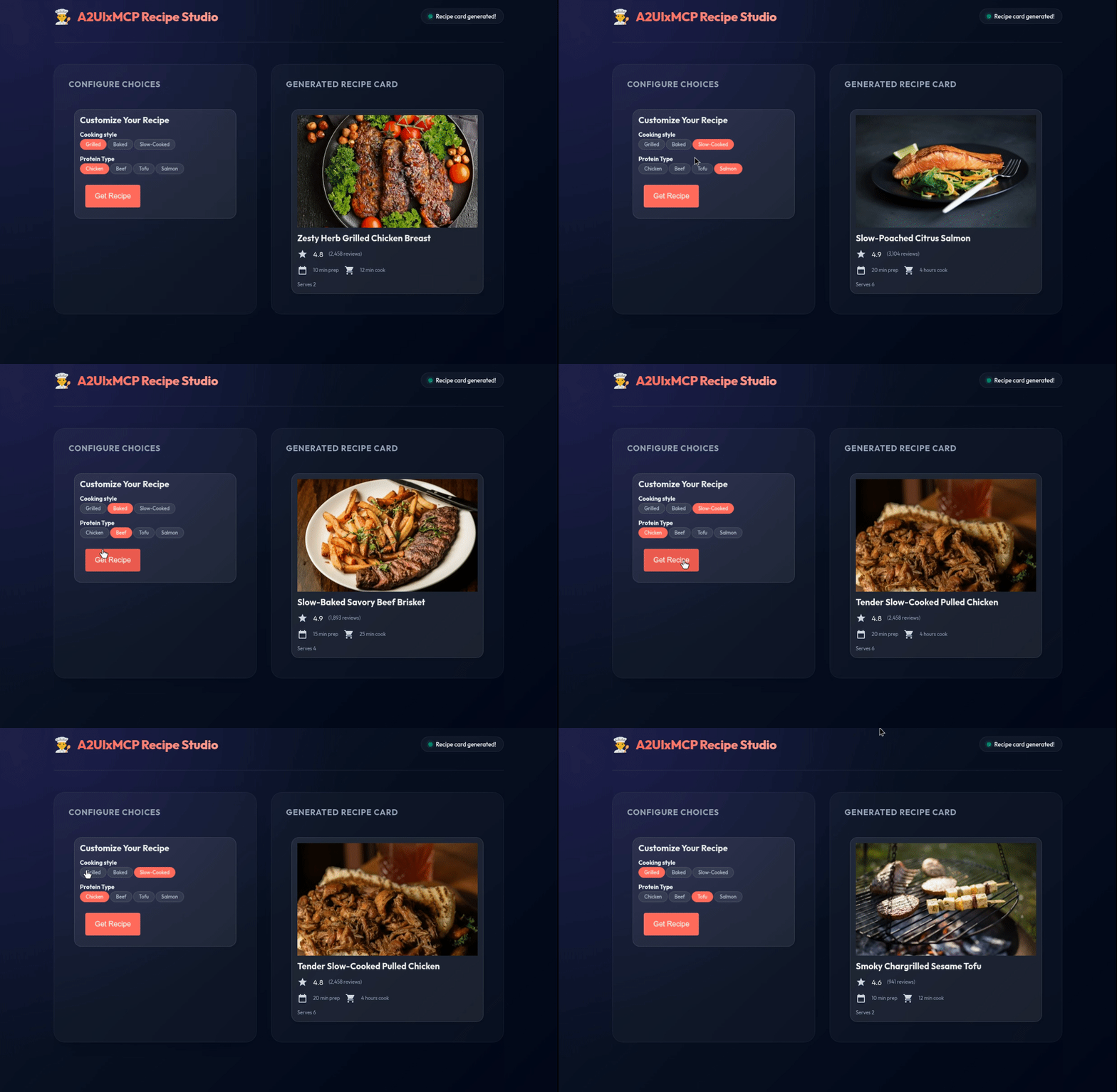
Browse additional MCP integrations in samples/community/mcp/.
Separating layout templates from tool data
Delivering A2UI over MCP splits an interface into cached presentation resources and per-call data updates:
- MCP resources (
resources/read) publish static component layouts (createSurfaceandupdateComponents) undera2ui://URIs with MIME typeapplication/a2ui+json. Because component properties bind to JSON Pointers such as/titleand/cookTime(see Data Model and Data Binding) instead of hardcoded values, clients fetch each template once and reuse it across calls. - Tool metadata (
_meta.ui) connects a tool to its layout resource by settingresourceUri(for example,"a2ui://recipe-card") andmimeType("application/a2ui+json") on the tool descriptor intools/list, on theCallToolResult, or on both. When aCallToolResultsets_meta.ui.resourceUri, its URI overrides any default URI declared on the tool descriptor. - Tool execution (
tools/call) computes the values for the current request and returns anEmbeddedResource(mimeType: "application/a2ui+json") containing anupdateDataModelmessage, paired with a plainTextContentsummary for text-only MCP hosts. - Client hydration resolves
_meta.ui.resourceUrifrom its local cache (callingresources/readonly on a cache miss), initializes the surface if it is not already live, and applies theupdateDataModelpayload to update bound components.
The sequence diagram below traces how an MCP client and MCP server exchange these messages: the client invokes tools/call for get_recipe_a2ui, receives a CallToolResult carrying both _meta.ui.resourceUri and an inline updateDataModel resource, fetches a2ui://recipe-card via resources/read only when the template is not yet cached, and applies both payloads to its local MessageProcessor.
sequenceDiagram  participant Client as MCP Client + A2UI Renderer  participant Server as MCP Server
  Client->>Server: tools/call (get_recipe_a2ui)  Server-->>Client: CallToolResult (updateDataModel + _meta.ui.resourceUri)  opt Template not in local cache    Client->>Server: resources/read (a2ui://recipe-card)    Server-->>Client: TextResourceContents (createSurface + updateComponents)  end  Note over Client: Apply cached template (if surface is new) and updateDataModel
Build an A2UI MCP server
The three steps below build a minimal recipe-card tool over MCP and connect it to a web renderer.
Step 1: Expose a layout template as an MCP resource
Create a JSON array that initializes the recipe-card surface and declares its component tree with data bindings instead of literal values. The example below uses the Basic Catalog, though A2UI catalogs are domain-specific and your template can target any custom catalog your client supports (see How to Define a Catalog).
In v1.0, protocol messages set "version": "1.0", data bindings use {"@path": "..."}, component IDs follow UAX #31 identifier syntax (such as main_column), and Text uses Markdown headings or "variant": "body" | "caption". In v0.9.1, messages set "version": "v0.9", data bindings use {"path": "..."}, and Text.variant includes heading variants such as "h3".
[ { "version": "1.0", "createSurface": { "surfaceId": "recipe-card", "catalogId": "https://a2ui.org/specification/v1_0/catalogs/basic/catalog.json" } }, { "version": "1.0", "updateComponents": { "surfaceId": "recipe-card", "components": [ { "id": "root", "component": "Card", "child": "main_column" }, { "id": "main_column", "component": "Column", "children": ["recipe_title", "cook_time"] }, { "id": "recipe_title", "component": "Text", "text": {"@path": "/title"} }, { "id": "cook_time", "component": "Text", "text": {"@path": "/cookTime"}, "variant": "caption" } ] } }][ { "version": "v0.9", "createSurface": { "surfaceId": "recipe-card", "catalogId": "https://a2ui.org/specification/v0_9/catalogs/basic/catalog.json" } }, { "version": "v0.9", "updateComponents": { "surfaceId": "recipe-card", "components": [ { "id": "root", "component": "Card", "child": "main-column" }, { "id": "main-column", "component": "Column", "children": ["recipe-title", "cook-time"] }, { "id": "recipe-title", "component": "Text", "text": {"path": "/title"}, "variant": "h3" }, { "id": "cook-time", "component": "Text", "text": {"path": "/cookTime"}, "variant": "caption" } ] } }]Publish that JSON array from your MCP server under a2ui://recipe-card with MIME type application/a2ui+json:
import {McpServer} from '@modelcontextprotocol/sdk/server/mcp.js';
const A2UI_MIME_TYPE = 'application/a2ui+json';const RECIPE_CARD_URI = 'a2ui://recipe-card';
const server = new McpServer({name: 'recipe-server', version: '1.0.0'});
server.registerResource(  'Recipe Card',  RECIPE_CARD_URI,  {    description: 'Static A2UI recipe card layout template.',    mimeType: A2UI_MIME_TYPE,  },  async () => ({    contents: [      {        uri: RECIPE_CARD_URI,        mimeType: A2UI_MIME_TYPE,        text: JSON.stringify(recipeCardTemplate),      },    ],  }),);
import jsonfrom mcp import typesfrom mcp.server.lowlevel import Serverfrom mcp.server.lowlevel.helper_types import ReadResourceContents
A2UI_MIME_TYPE = "application/a2ui+json"RECIPE_CARD_URI = "a2ui://recipe-card"
app = Server("recipe-server")
# Requires mcp<2 (pip install "mcp>=1.20,<2") for the 1.x low-level Server decorators.@app.list_resources()async def list_resources() -> list[types.Resource]: return [ types.Resource( uri=RECIPE_CARD_URI, name="Recipe Card", mimeType=A2UI_MIME_TYPE, description="Static A2UI recipe card layout template.", ) ]
@app.read_resource()async def read_resource(uri: str) -> list[ReadResourceContents]: if str(uri) == RECIPE_CARD_URI: return [ ReadResourceContents( content=json.dumps(recipe_card_template), mime_type=A2UI_MIME_TYPE, ) ] raise ValueError(f"Unknown resource: {uri}")Step 2: Link a tool and return data model updates
Attach _meta.ui to the get_recipe_a2ui tool and return an EmbeddedResource (mimeType: "application/a2ui+json") carrying an updateDataModel message for "surfaceId": "recipe-card". Include a TextContent item in the same content array so MCP clients without an A2UI renderer still receive a readable summary.
Here is the updateDataModel payload encoded inside the tool’s EmbeddedResource.resource.text:
[ { "version": "1.0", "updateDataModel": { "surfaceId": "recipe-card", "path": "/", "value": { "title": "Herb-Crusted Baked Salmon", "cookTime": "18 mins" } } }][ { "version": "v0.9", "updateDataModel": { "surfaceId": "recipe-card", "path": "/", "value": { "title": "Herb-Crusted Baked Salmon", "cookTime": "18 mins" } } }]Register get_recipe_a2ui with _meta.ui.resourceUri and return the CallToolResult:
import {z} from 'zod';
server.registerTool(  'get_recipe_a2ui',  {    title: 'Get Recipe A2UI',    description: 'Returns recipe data and links to the recipe-card template.',    inputSchema: {      cookingStyle: z.array(z.string()).optional(),      protein: z.array(z.string()).optional(),    },    _meta: {      ui: {        resourceUri: RECIPE_CARD_URI,        mimeType: A2UI_MIME_TYPE,      },    },  },  async ({cookingStyle, protein}) => {    const style = cookingStyle?.[0] ?? 'Baked';    const item = protein?.[0] ?? 'Salmon';    const recipe = lookupRecipe(style, item);
    const dataModelUpdate = [      {        version: '1.0',        updateDataModel: {          surfaceId: 'recipe-card',          path: '/',          value: {            title: recipe.title,            cookTime: recipe.cookTime,          },        },      },    ];
    return {      content: [        {type: 'text', text: `Generated recipe: ${recipe.title}`},        {          type: 'resource',          resource: {            uri: `${RECIPE_CARD_URI}/data`,            mimeType: A2UI_MIME_TYPE,            text: JSON.stringify(dataModelUpdate),          },        },      ],      _meta: {        ui: {          resourceUri: RECIPE_CARD_URI,          mimeType: A2UI_MIME_TYPE,        },      },    };  },);
from typing import Any
@app.list_tools()async def list_tools() -> list[types.Tool]: return [ types.Tool( name="get_recipe_a2ui", title="Get Recipe A2UI", description="Returns recipe data and links to the recipe-card template.", inputSchema={ "type": "object", "properties": { "cookingStyle": {"type": "array", "items": {"type": "string"}}, "protein": {"type": "array", "items": {"type": "string"}}, }, }, _meta={ "ui": { "resourceUri": RECIPE_CARD_URI, "mimeType": A2UI_MIME_TYPE, } }, ) ]
@app.call_tool()async def handle_call_tool( name: str, arguments: dict[str, Any]) -> types.CallToolResult: if name != "get_recipe_a2ui": raise ValueError(f"Unknown tool: {name}")
style = (arguments.get("cookingStyle") or ["Baked"])[0] protein = (arguments.get("protein") or ["Salmon"])[0] recipe = lookup_recipe(style, protein)
data_model_update = [ { "version": "1.0", "updateDataModel": { "surfaceId": "recipe-card", "path": "/", "value": { "title": recipe["title"], "cookTime": recipe["cookTime"], }, }, } ]
return types.CallToolResult( content=[ types.TextContent( type="text", text=f"Generated recipe: {recipe['title']}", ), types.EmbeddedResource( type="resource", resource=types.TextResourceContents( uri=f"{RECIPE_CARD_URI}/data", mimeType=A2UI_MIME_TYPE, text=json.dumps(data_model_update), ), ), ], _meta={ "ui": { "resourceUri": RECIPE_CARD_URI, "mimeType": A2UI_MIME_TYPE, } }, )Step 3: Connect the client and hydrate the surface
On web clients, callMcpTool in @a2ui/catalog-mcp handles template discovery, URI caching, and message forwarding automatically once you pass your MessageProcessor to configureMcpCatalog. In v1.0, register mcpCatalog alongside basicCatalog; in v0.9.1 (where each surface binds to a single catalog), compose CallMcpToolImplementation into a '0.9' Catalog and pass defaultVersion: 'v0.9':
import {configureMcpCatalog, mcpCatalog} from '@a2ui/catalog-mcp';import {basicCatalog, MessageProcessor} from '@a2ui/web_core/v1_0';import {Client} from '@modelcontextprotocol/sdk/client/index.js';
const mcpClient = new Client({name: 'recipe-web-client', version: '1.0.0'});// Connect mcpClient to your StreamableHTTPClientTransport or SSEClientTransport.
const processor = new MessageProcessor([basicCatalog, mcpCatalog]);configureMcpCatalog({  getMcpClientForTool: () => mcpClient,  processor,});
import {CallMcpToolImplementation, configureMcpCatalog} from '@a2ui/catalog-mcp';import {basicCatalog, Catalog, MessageProcessor} from '@a2ui/web_core/v0_9';import {Client} from '@modelcontextprotocol/sdk/client/index.js';
const mcpClient = new Client({name: 'recipe-web-client', version: '1.0.0'});// Connect mcpClient to your StreamableHTTPClientTransport or SSEClientTransport.
const v09Catalog = new Catalog( basicCatalog.id, '0.9', [...basicCatalog.components.values()], [...basicCatalog.functions.values(), CallMcpToolImplementation],);const processor = new MessageProcessor([v09Catalog]);configureMcpCatalog({ getMcpClientForTool: () => mcpClient, processor, defaultVersion: 'v0.9',});An interactive A2UI component (such as a Get Recipe button on another surface) can then invoke get_recipe_a2ui directly through callMcpTool:
{ "id": "submit_button", "component": "Button", "child": "submit_button_text", "variant": "primary", "action": { "functionCall": { "@call": "callMcpTool", "catalogId": "https://a2ui.org/specification/v1_0/catalogs/mcp/catalog.json", "args": { "name": "get_recipe_a2ui", "arguments": { "cookingStyle": {"@path": "/cookingStyle"}, "protein": {"@path": "/protein"} } } } }}{ "id": "submit-button", "component": "Button", "child": "submit-button-text", "variant": "primary", "action": { "functionCall": { "call": "callMcpTool", "args": { "name": "get_recipe_a2ui", "arguments": { "cookingStyle": {"path": "/cookingStyle"}, "protein": {"path": "/protein"} } } } }}When callMcpTool executes, it reads _meta.ui.resourceUri, fetches and caches a2ui://recipe-card on first use (skipping createSurface if recipe-card is already active), and forwards the inline updateDataModel messages to processor. For Lit, React, and Angular setup details, see Call MCP Tools from A2UI.
Production server practices
Validate server payloads with the Agent SDK
Before serving static templates or generated tool payloads from an MCP server, validate them against the target catalog with the A2UI Agent SDK. validatePayload (validate_payload in Python) checks message schemas, component properties, and surface tree topology (such as missing roots or unresolved child IDs) the same way a renderer does.
Swift (A2UISwiftCore and A2UISwiftUI) and Kotlin (androidx.a2ui and androidx.a2ui.compose) target client-side rendering rather than server-side agent generation, so Agent SDK validation is provided in TypeScript, Python, and Dart:
import {validatePayload} from '@a2ui/agent';import {basicCatalog} from '@a2ui/web_core/v1_0';
// Throws A2uiValidationError if a v1.0 renderer holding basicCatalog would reject the payload.validatePayload([basicCatalog], a2uiPayload);
from a2ui.core.basic_catalog import BasicCatalogfrom a2ui.utils import validate_payload
# Raises A2uiValidationError if a v1.0 renderer holding BasicCatalog would reject the payload.validate_payload([BasicCatalog("1.0")], a2ui_payload)import 'package:a2ui_agent/a2ui_agent.dart';import 'package:a2ui_core/a2ui_core.dart';
// Throws A2uiValidationError if a v1.0 renderer holding BasicCatalog.v1_0() would reject the payload.final parsed = AgentToRendererMessagePayload.fromJson( a2uiPayload, protocolVersion: A2uiProtocolVersion.v1_0,);validatePayload([BasicCatalog.v1_0()], parsed.messages);For prompt generation, streaming parsers, and stateful validation across turns with RendererState, see How to Integrate A2UI into an Agent.
Control LLM context visibility
When an LLM host orchestrates your MCP tool calls, attach MCP resource annotations (audience) to the EmbeddedResource to control whether the raw A2UI JSON enters the model’s conversation context on subsequent turns:
const uiResource = { type: 'resource' as const, resource: { uri: 'a2ui://recipe-card/data', mimeType: 'application/a2ui+json', text: JSON.stringify(dataModelUpdate), }, // Render for the user while keeping raw A2UI JSON out of the LLM context window. annotations: { audience: ['user' as const], },};ui_resource = types.EmbeddedResource( type="resource", resource=types.TextResourceContents( uri="a2ui://recipe-card/data", mimeType="application/a2ui+json", text=json.dumps(data_model_update), ), # Render for the user while keeping raw A2UI JSON out of the LLM context window. annotations=types.Annotations(audience=["user"]),)audience value | Behavior |
|---|---|
| (omitted) | Visible to both the user’s renderer and the LLM. |
["user"] | Rendered for the user and excluded from the LLM context window. |
["assistant"] | Passed to the LLM for follow-up reasoning without rendering on the client. |
Full bidirectional A2UI transport over MCP
In Steps 1 to 3 above, UI buttons invoke domain MCP tools (get_recipe_a2ui) directly through callMcpTool. When an application instead uses MCP as its sole agent-to-renderer transport (without a separate A2A or AG-UI channel), the client also advertises its supported catalogs to the server and forwards generic action.event and renderer error payloads through dedicated MCP tools.
Negotiate supported catalogs
When an MCP server supports multiple catalogs or protocol versions, the client advertises which catalogs its renderer can display (renderer_capabilities.json in v1.0, client_capabilities.json in v0.9.1). On web clients, processor.getRendererCapabilities({versions: ['1.0']}) builds this capabilities object from the catalogs registered on MessageProcessor.
Stateful sessions via MCP initialization
Because MCP sessions are stateful by default, declare A2UI capabilities once in params.capabilities.a2ui during the initialize handshake and store them on the server for the session lifetime:
{ "jsonrpc": "2.0", "method": "initialize", "id": "init-123", "params": { "protocolVersion": "2025-11-25", "clientInfo": { "name": "a2ui-enabled-client", "version": "1.0.0" }, "capabilities": { "a2ui": { "rendererCapabilities": { "1.0": { "supportedCatalogIds": [ "https://a2ui.org/specification/v1_0/catalogs/basic/catalog.json", "https://a2ui.org/specification/v1_0/catalogs/mcp/catalog.json" ] } } } } }}{ "jsonrpc": "2.0", "method": "initialize", "id": "init-123", "params": { "protocolVersion": "2025-11-25", "clientInfo": { "name": "a2ui-enabled-client", "version": "1.0.0" }, "capabilities": { "a2ui": { "clientCapabilities": { "v0.9": { "supportedCatalogIds": [ "https://a2ui.org/specification/v0_9/catalogs/basic/catalog.json" ] } } } } }}Stateless servers via per-call metadata
When an HTTP MCP server handles each request without session state, pass the same capabilities object in params._meta.a2ui on individual tools/call requests:
{ "jsonrpc": "2.0", "method": "tools/call", "id": "call-123", "params": { "name": "generate_report", "arguments": {"date": "2026-03-01"}, "_meta": { "a2ui": { "rendererCapabilities": { "1.0": { "supportedCatalogIds": [ "https://a2ui.org/specification/v1_0/catalogs/basic/catalog.json" ] } } } } }}{ "jsonrpc": "2.0", "method": "tools/call", "id": "call-123", "params": { "name": "generate_report", "arguments": {"date": "2026-03-01"}, "_meta": { "a2ui": { "clientCapabilities": { "v0.9": { "supportedCatalogIds": [ "https://a2ui.org/specification/v0_9/catalogs/basic/catalog.json" ] } } } } }}Forward user actions and client errors as MCP tools
When a component uses functionCall with callMcpTool (as in Step 3), the client calls the target MCP tool directly. Alternatively, components can emit an A2UI action event (see Actions and Functions), and the host application can forward both user actions and renderer error events to dedicated MCP tools on the server.
Forward action.event payloads to a2ui_action
Declare an action.event on a Button with data-bound context entries:
{ "id": "confirm_button", "component": "Button", "child": "confirm_button_text", "action": { "event": { "name": "confirm_booking", "context": { "start": {"@path": "/dates/start"}, "end": {"@path": "/dates/end"} } } }}{ "id": "confirm-button", "component": "Button", "child": "confirm-button-text", "action": { "event": { "name": "confirm_booking", "context": { "start": {"path": "/dates/start"}, "end": {"path": "/dates/end"} } } }}When clicked, the renderer resolves /dates/start and /dates/end against the surface DataModel and emits an action containing all five required fields (name, surfaceId, sourceComponentId, timestamp, and context). Your MCP client forwards those fields as arguments to an a2ui_action tool:
{ "jsonrpc": "2.0", "method": "tools/call", "id": "call-456", "params": { "name": "a2ui_action", "arguments": { "name": "confirm_booking", "surfaceId": "booking-surface", "sourceComponentId": "confirm_button", "timestamp": "2026-03-20T12:00:00Z", "context": { "start": "2026-03-20", "end": "2026-03-25" } } }}Declare all five parameters in the server’s a2ui_action tool schema so schema-validating MCP SDKs do not strip surfaceId, sourceComponentId, or timestamp:
import {z} from 'zod';
server.registerTool(  'a2ui_action',  {    title: 'A2UI Action',    description: 'Handles user actions emitted by A2UI surfaces.',    inputSchema: {      name: z.string(),      surfaceId: z.string(),      sourceComponentId: z.string(),      timestamp: z.string(),      context: z.record(z.string(), z.unknown()),    },  },  async ({name, surfaceId, context}) => {    if (name === 'confirm_booking') {      return {        content: [          {            type: 'text',            text: `Booking confirmed on ${surfaceId}: ${String(context.start)} to ${String(context.end)}`,          },        ],      };    }    throw new Error(`Unknown action: ${name}`);  },);
# In @app.list_tools(), declare name, surfaceId, sourceComponentId, timestamp,# and context in the "a2ui_action" inputSchema, then handle it in @app.call_tool():if name == "a2ui_action": action_name = arguments["name"] surface_id = arguments["surfaceId"] context = arguments["context"] if action_name == "confirm_booking": return types.CallToolResult( content=[ types.TextContent( type="text", text=( f"Booking confirmed on {surface_id}:" f" {context['start']} to {context['end']}" ), ) ] ) raise ValueError(f"Unknown action: {action_name}")Forward validation and runtime errors to a2ui_error
Pass an errorHandler in MessageProcessorOptions (or call processor.processMessagesWithErrors) for inbound validation failures and subscribe to surface.onError for runtime expression failures, forwarding the error fields to an a2ui_error tool so the server can log the failure or return a corrected payload:
{ "jsonrpc": "2.0", "method": "tools/call", "id": "call-789", "params": { "name": "a2ui_error", "arguments": { "code": "VALIDATION_FAILED", "surfaceId": "booking-surface", "path": "/components/0/text", "message": "Expected string or DynamicString for Text.text." } }}Next steps
- Configure
@a2ui/catalog-mcp,callMcpTool, and client-side data functions (transformData,split,regexCapture) in Call MCP Tools from A2UI. - Embed sandboxed HTML MCP Apps (
ui://) inside A2UI surfaces in Embed MCP Apps in A2UI Surfaces. - Render A2UI surfaces inside a standalone MCP App iframe in Render A2UI Inside an MCP App.
- Explore runnable MCP servers and clients in
samples/community/mcp/.